

7. Governance & Change Management
Good governance means keeping schemas clean, audit logs current, SLAs monitored, and approval escalation configured.
7.1 Maintaining Workflow Integrity (Versioning and Duplication)
Keep your Request Types clean by managing drafting, testing, and deprecation deliberately.
- Schema Version Control
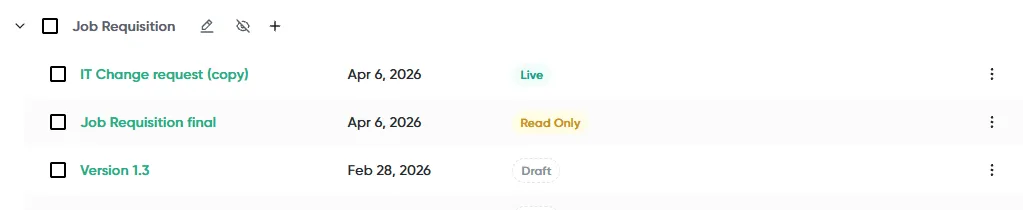
To ensure system stability, direct changes cannot be made to a schema once it is actively in use (“Live”) or has associated requests.
-
Duplicating for Changes: If modifications to a live schema are required, the administrator must duplicate the schema. This creates a separate copy that can be modified, tested in Preview Mode, and then pushed to Live when ready, preventing disruption to ongoing processes.
-
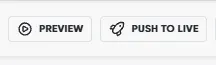
Preview and Testing: Use Preview Mode to test the complete workflow (requester experience, conditional logic, and approval steps) before pushing any changes to Live. If issues like missing text or incorrect conditions are detected, the system will provide a warning before the schema can go live.
- Standardizing Request Naming and Structure
Consistent naming and structure help users and reporting remain clear:
-
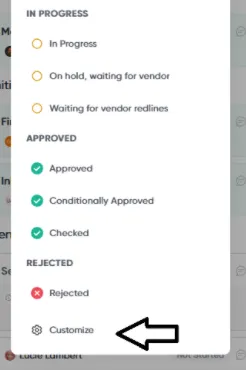
Custom Statuses: Admins should use Custom Statuses to improve granular tracking and visibility into where requests are stalled. Custom statuses, once created, are globally available for all requests (e.g., “Awaiting Legal,” “Pending Vendor Info,” “On Hold,” “Conditionally Approved”).
-
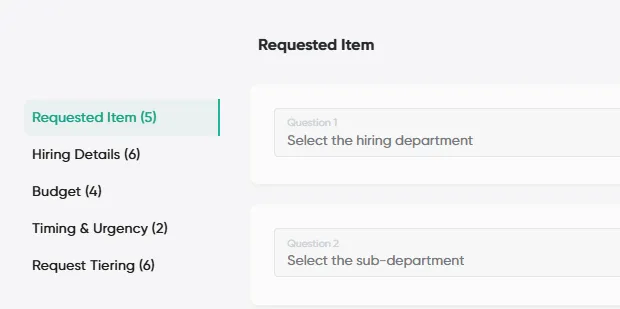
Requester Tab Sections: For complex request types, divide the Requester Tab into multiple logical Sections (e.g., General Information, Financial Details). This improves navigation for requesters and clarifies submissions for approvers.
- Handling Duplicate Schemas
If multiple schemas exist that serve similar functions, they should be reconciled. The system simplifies maintenance by allowing Admins to componentize schemas using the Create Request Step.
For instance, common processes like Vendor Onboarding or Security due diligence can be built as separate child schemas and reused across different parent flows (e.g., Software Purchase, Services Request).
7.2 Proactive Compliance and Audit Readiness
Opstream supports audit and compliance management through centralized data, automated reminders, and detailed logging.
- Utilizing Automated Workflows for Compliance
Administrators can configure automated workflows to ensure timely compliance reviews:
-
Risk-Based Recollection: Set up a dedicated Security Schema to manage the collection and recollection of compliance documents, such as SOC-II reports. Workflows can be designed to trigger recollection requests conditionally based on a Vendor Risk Level attribute. For example, the system can be configured to Create Automated Request for Recollection (assigned to the Vendor Owner) only if the Vendor Risk Level = High. This reduces noise and ensures that effort is focused solely on high-risk or critical vendors.
-
Legal Reminders: Automated reminders can be triggered based on date attributes, such as sending a Reminder to the Legal team 30 days before the NDA Expiry Date.
-
Data Consistency (AI Extraction Add-on): The optional AI Extraction feature helps Legal teams capture critical contract terms (like renewal dates and liability caps) consistently from uploaded documents, eliminating manual data entry. Extracted data is marked as Needs Validation until an Admin manually reviews and approves the values.
- Auditing and Logging
Admins have full visibility into all system data and management functions
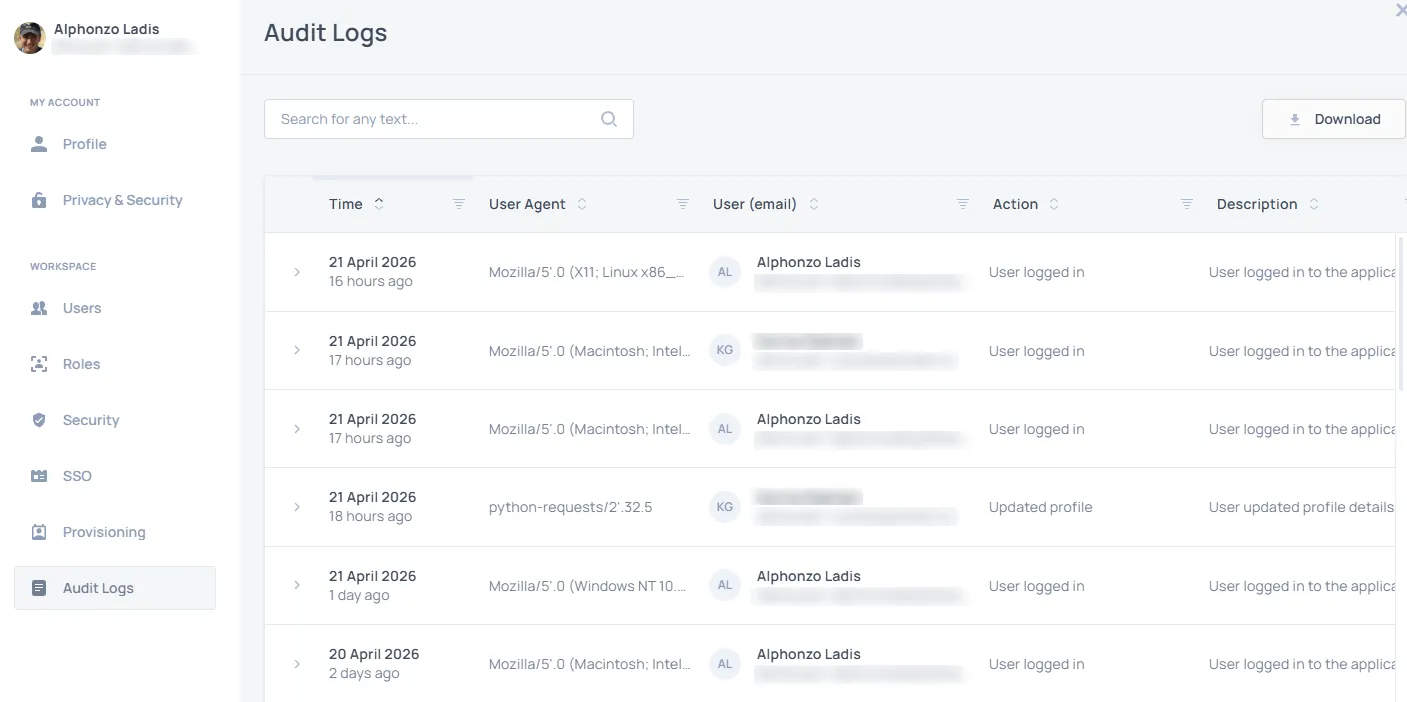
- Audit Logs: Detailed Audit Logs are accessible to Admins and track every important action taken within the system for transparency and compliance. Logs can be filtered by date, user, action, description, or severity, and can be exported for record-keeping or security audits.
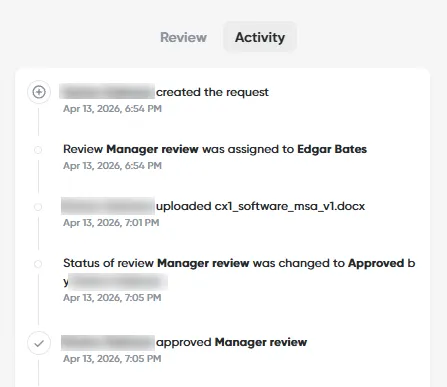
- Activity Tracking: Every action in an individual request, including status changes, notifications (via the Notify User step), and approval decisions, is recorded in the workflow’s Activity Log.
7.3 Setting and Monitoring SLAs (Decision Time)
Opstream allows Admins to define and track performance targets directly within the workflow configuration.
-
Setting Target Time: Every Approval Task Card allows configuration of a Target Time. This setting represents the Service Level Agreement (SLA) for that specific review step, measured in calendar days.
-
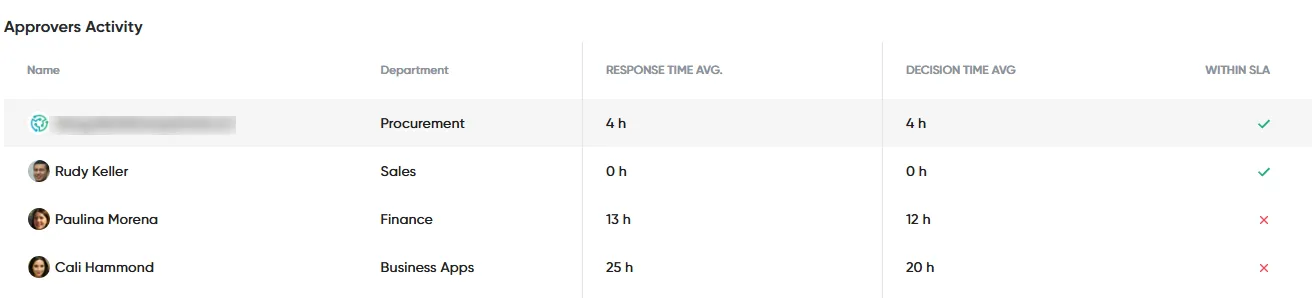
Monitoring Performance: Performance against these targets can be monitored using the Analytics module. The Approvers Table specifically measures:
-
Average Decision Time.
-
Percentage of Decisions made on time (i.e., completed within their SLA).
-
- Notifications for Delays: The workflow capabilities allow for automation to address delays, such as setting up reminders or creating automated requests to escalate a review when a deadline approaches.
7.4 Defining Financial Escalation Policy (Approval Brackets)
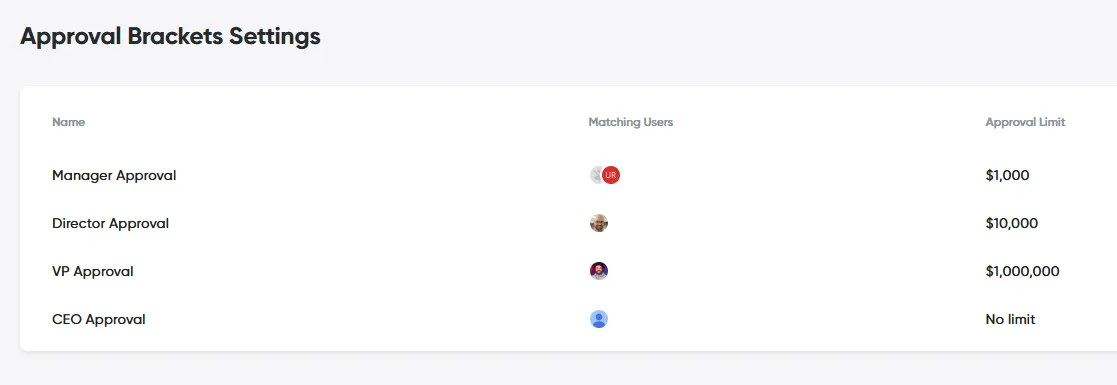
Opstream centralizes financial governance through Approval Brackets, which define the approval eligibility based on request value (spend threshold).
-
Purpose: This feature ensures that escalating financial approvals (e.g., automatically routing a $100K+ request to a C-level executive) are correctly applied across all workflows in the platform without manual configuration per schema.
-
Impact: Approval Brackets serve as the definitive source of truth for spend control and help organizations stay audit-ready by demonstrating that appropriate management levels review high-value transactions.
-
Configuration: Brackets are set globally under the Profile menu.
This site uses anonymous analytics to work out which pages are useful. Visits are not tied to anyone, and nothing you type is recorded. See the Opstream privacy policy.